






|
Downloading your fonts
How do I download my fonts?
Immediately after your payment is made, you will be presented with a green "Download" button (or two if you chose a Bonus Gift also). If you didn't download your fonts immediately after you ordered, simply login to your Account Manager and you'll see them there. Click on the green "Download" button and save the .zip package to your hard drive. Your browser may give you the option to open the file rather than save it. We recommend saving the file to your hard drive rather than simply opening from the browser.
Downloads expire after two years or four downloads, (whichever comes first) so it is recommended that you save the .zip packages you download to a hard drive for backup purposes. To install the fonts on an iPad, download them using a desktop or laptop computer and then transfer them to the iPad. Attempting to download them from your account using your iPad won't work. 
What is "Reset Downloads"? We encourage you to save the .zip packages to your computer for safekeeping. If it has been more than two years since your order or you have downloaded the package four times, you may click the "Reset Downloads" link to add the fonts to your cart at a 50% discount and proceed to reorder them. This reset fee enables us to continue offering lifetime support and helps pay for server fees.
This also allows us to continue making improvements to the fonts so that you always receive the latest high quality versions. If it has been less than two years since your order and you have exceeded your four allotted downloads, you may contact us for a one-time free reset.
I don't know where I saved the download Depending on your internet browser, you may or may not see a dialog window asking you where to save the .zip file. To find the package easily, we recommend that you choose to save the file to your Desktop. If you do not see any dialog window asking you where to save the file, but instead see only a "Downloads Finished" or similar confirmation, chances are good that the file was automatically saved to your system "Downloads" folder by default. If you still can't find the file, you can choose to do a search of your system or download the file from your Letterhead Fonts Account Manage again. However, keep in mind that each click consumes one of your four alloted downloads. If there has been a mistake and it has not been 2 years since your order, contact us for a free reset.
When do I receive my fonts? All fonts are downloaded immediately. After you order goes through, you are presented with a green Download button (or 2 if you chose a Bonus Gift also). If you didn't download your fonts immediately after you ordered, simply login to your Account Manager and you'll see them there.
Downloading an updated font set We often release updates to existing fonts. These updates can include improved kerning, changes to letters, and even additional styles. These revisions (unless the font has been completely redrawn) are always free to customers who previously purchased the font set.
To download the updated font set, simply follow these steps: 1) Uninstall the existing version(s) of the font set from your system Fonts folder. 2) Login to your Letterhead Fonts Account Manager. 3) Download the .zip package for the order containing the revised font (we've already reset your downloads for this package). 4) Making sure that your applications are closed, follow the instructions for installing your fonts. Note: Windows users must be aware that when you double-click on an updated font that has the same name as a font you already have installed, Windows shows you a preview of the installed version rather than the actual updated version. All versions of Windows behave this way. For example, let's say we issued an update to a font, revising it from 1.0 to 2.0. You then download this new version from your account and save it to your Desktop. Double-clicking on the font to see a preview, shows you a preview of the installed version (which reads 1.0), rather than the font you have actually downloaded (version 2.0). This is because the new version has the same name as the installed version. Windows is actually showing you a preview of the installed version. This is why step number 1 is uninstalling the old font. If you uninstall the old version from the Windows Fonts folder first, and again double-click on the new version, you will see the correct preview. Once the new version is installed, open your application. With the newly installed font chosen you can easily check which version you're currently using by typing the bar (straight vertical line) character: |. The bar character is usually located above the Enter key on your keyboard. Typing that key will generate the LHF insignia with the current version number and release date. 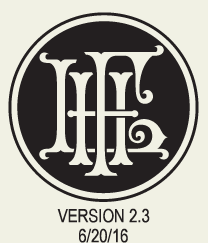
I didn't download my bonus gift If you chose a free bonus font or panel, these are located in a separate .zip file after you order. If you missed downloading it, Log in to your Account Manager and you will find the bonus gift below your order in a section named "Bonus Gifts". If you forgot to choose a free bonus gift and are entitled to one, contact us so we can add it to your account.
How do I download fonts I've lost? To download previously purchased fonts, please login to your account. For security purposes these download packages expire after four downloads or two years, whichever comes first.
If you have exceeded your four downloads and need to download the package again, please contact us. As long as it has not been more than two years since the package was ordered, we will be happy to reset it for you. If you are installing the fonts on a new computer, please remove them from the old computer first. If it has been more than two years since the package was ordered, you may repurchase a license for the fonts. This will ensure that you receive the latest version of the fonts which may include improvements and bug fixes.
Trouble downloading on iPad There is a known compatibility issue with our package creator and the iPad. Please download the fonts using a desktop or laptop computer and then transfer them to your iPad. Installing the fonts on the iPad will require a third-party application such as iFont. |
 |
|

FAQ
 Before You Order Ordering Accessing Alternates Downloading Fonts Redownload Fonts Updating Your Fonts Installing Your Fonts Using LHF Desire Convert to Outlines Compatible Programs OTF Test Font Bugs & Quirks License & Usage Tutorials Contact Us |
  |
 |
|
||||
|
|||||
CONTACT
 VIEW ALL FONTS
FREE STUFF
BONUS GIFTS
LICENSE & USAGE
PRIVACY POLICY
HAPPY CUSTOMERS SAY...
LIFETIME GUARANTEE
REPORT PIRACY
FONTGUARD
SUBSCRIBE
VIEW ALL FONTS
FREE STUFF
BONUS GIFTS
LICENSE & USAGE
PRIVACY POLICY
HAPPY CUSTOMERS SAY...
LIFETIME GUARANTEE
REPORT PIRACY
FONTGUARD
SUBSCRIBE
|
|
|
|
|
|
|